---
title: "Android性能优化之布局优化"
author: "Trinea"
date: "2013-08-13T20:20:50Z"
tags: []
categories: ["移动开发"]
slug: "android"
draft: false
lastmod: "2013-08-13T20:43:13Z"
id: 1924147
url: "https://trinea.iteye.com/blog/1924147"
---
最新最准确内容建议直接访问原文:[Android性能优化之布局优化](http://www.trinea.cn/android/layout-performance/)
本文为Android性能优化的第二篇——布局优化,主要介绍**使用抽象布局标签(include, viewstub, merge)、去除不必要的嵌套和View节点、减少不必要的infalte及其他Layout方面可调优点,顺带提及布局调优相关工具(hierarchy viewer和lint)**。
**1、抽象布局标签**
**(1) <include>标签**
include标签常用于将布局中的公共部分提取出来供其他layout共用,以实现布局模块化,这在布局编写方便提供了大大的便利。
下面以在一个布局main.xml中用include引入另一个布局foot.xml为例。main.mxl代码如下:
```
```
其中include引入的foot.xml为公用的页面底部,代码如下:
```
```
<include>标签唯一需要的属性是layout属性,指定需要包含的布局文件。可以定义android:id和android:layout\_\*属性来覆盖被引入布局根节点的对应属性值。注意重新定义android:id后,子布局的顶结点i就变化了。
**(2) <viewstub>标签**
viewstub标签同include标签一样可以用来引入一个外部布局,不同的是,viewstub引入的布局默认不会扩张,即既不会占用显示也不会占用位置,从而在解析layout时节省cpu和内存。
viewstub常用来引入那些默认不会显示,只在特殊情况下显示的布局,如进度布局、网络失败显示的刷新布局、信息出错出现的提示布局等。
下面以在一个布局main.xml中加入网络错误时的提示页面network\_error.xml为例。main.mxl代码如下:
```
……
```
其中network\_error.xml为只有在网络错误时才需要显示的布局,默认不会被解析,示例代码如下:
```
```
在java中通过(ViewStub)findViewById(id)找到ViewStub,通过stub.inflate()展开ViewStub,然后得到子View,如下:
```
private View networkErrorView;
private void showNetError() {
// not repeated infalte
if (networkErrorView != null) {
networkErrorView.setVisibility(View.VISIBLE);
return;
}
ViewStub stub = (ViewStub)findViewById(R.id.network_error_layout);
networkErrorView = stub.inflate();
Button networkSetting = (Button)networkErrorView.findViewById(R.id.network_setting);
Button refresh = (Button)findViewById(R.id.network_refresh);
}
private void showNormal() {
if (networkErrorView != null) {
networkErrorView.setVisibility(View.GONE);
}
}
```
在上面showNetError()中展开了ViewStub,同时我们对networkErrorView进行了保存,这样下次不用继续inflate。这就是后面第三部分提到的减少不必要的infalte。
viewstub标签大部分属性同include标签类似。
上面展开ViewStub部分代码
```
ViewStub stub = (ViewStub)findViewById(R.id.network_error_layout);
networkErrorView = stub.inflate();
```
也可以写成下面的形式
```
View viewStub = findViewById(R.id.network_error_layout);
viewStub.setVisibility(View.VISIBLE); // ViewStub被展开后的布局所替换
networkErrorView = findViewById(R.id.network_error_layout); // 获取展开后的布局
```
效果一致,只是不用显示的转换为ViewStub。通过viewstub的原理我们可以知道将一个view设置为GONE不会被解析,从而提高layout解析速度,而VISIBLE和INVISIBLE这两个可见性属性会被正常解析。
**(3) <merge>标签**
在使用了include后可能导致布局嵌套过多,多余不必要的layout节点,从而导致解析变慢,不必要的节点和嵌套可通过hierarchy viewer(下面布局调优工具中有具体介绍)或设置->开发者选项->显示布局边界查看。
merge标签可用于两种典型情况:
a. 布局顶结点是FrameLayout且不需要设置background或padding等属性,可以用merge代替,因为Activity内容试图的parent view就是个FrameLayout,所以可以用merge消除只剩一个。
b. 某布局作为子布局被其他布局include时,使用merge当作该布局的顶节点,这样在被引入时顶结点会自动被忽略,而将其子节点全部合并到主布局中。
以(1) <include>标签的示例为例,用hierarchy viewer查看main.xml布局如下图:
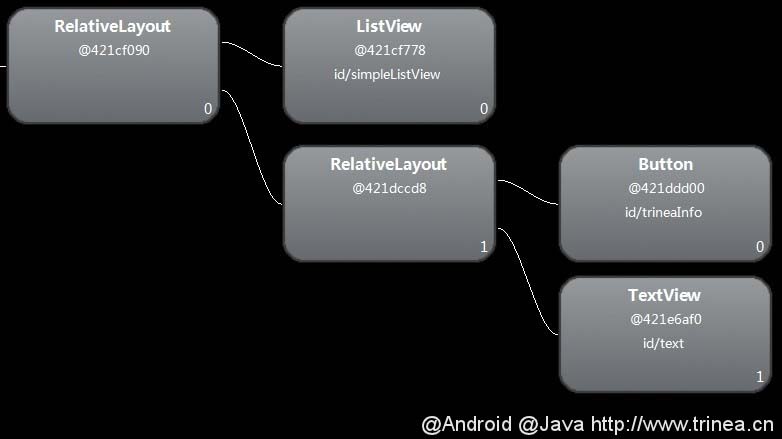
可以发现多了一层没必要的RelativeLayout,将foot.xml中RelativeLayout改为merge,如下:
```
```
运行后再次用hierarchy viewer查看main.xml布局如下图:
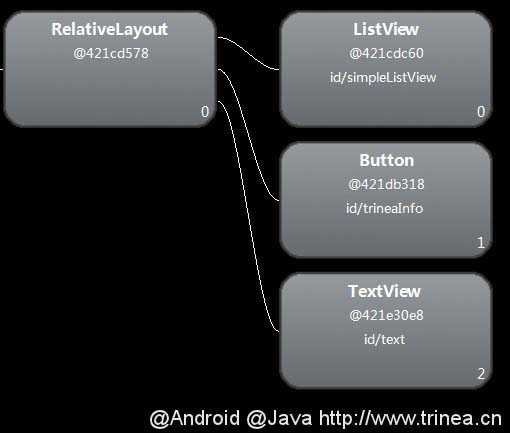
这样就不会有多余的RelativeLayout节点了。
**2、去除不必要的嵌套和View节点**
更多调优方式及调优工具介绍见原文:[Android性能优化之布局优化](http://www.trinea.cn/android/layout-performance/)
**你可能还感兴趣:**
[Android性能调优](http://www.trinea.cn/android/android%e6%80%a7%e8%83%bd%e8%b0%83%e4%bc%98/ "Android性能调优")
[Android性能优化之数据库优化](http://www.trinea.cn/android/database-performance/ "性能优化之数据库优化")
[Android 图片内存缓存](http://www.trinea.cn/android/android-imagecache%e5%9b%be%e7%89%87%e7%bc%93%e5%ad%98%ef%bc%8c%e4%bd%bf%e7%94%a8%e7%ae%80%e5%8d%95%ef%bc%8c%e6%94%af%e6%8c%81%e9%a2%84%e5%8f%96%ef%bc%8c%e6%94%af%e6%8c%81%e5%a4%9a%e7%a7%8d%e7%bc%93/ "Android ImageCache图片缓存,使用简单,支持预取,支持多种缓存算法,支持不同网络类型,扩展性强")
[Android 图片SD卡缓存](http://www.trinea.cn/android/android-%e5%9b%be%e7%89%87sd%e5%8d%a1%e7%bc%93%e5%ad%98-%e4%bd%bf%e7%94%a8%e7%ae%80%e5%8d%95-%e6%94%af%e6%8c%81%e9%a2%84%e5%8f%96-%e6%94%af%e6%8c%81%e5%a4%9a%e7%a7%8d%e7%bc%93%e5%ad%98%e7%ae%97/ "Android 图片SD卡缓存 使用简单 支持预取 支持多种缓存算法 支持不同网络类型 支持序列化")
[Android公共库(缓存 下拉ListView 下载管理Pro 静默安装 root运行 Java公共类)](http://www.trinea.cn/android/android%e5%85%ac%e5%85%b1%e5%ba%93%e7%bc%93%e5%ad%98-%e4%b8%8b%e6%8b%89listview-%e4%b8%8b%e8%bd%bd%e7%ae%a1%e7%90%86pro-%e9%9d%99%e9%bb%98%e5%ae%89%e8%a3%85-root%e8%bf%90%e8%a1%8c-java%e5%85%ac/ "Android公共库(缓存 下拉ListView 下载管理Pro 静默安装 root运行 Java公共类)")