---
title: "滚动到底部加载更多及下拉刷新listview的使用"
author: "Trinea"
date: "2013-06-24T21:11:07Z"
tags: []
categories: ["移动开发"]
slug: "listview"
draft: false
lastmod: "2014-01-05T10:16:41Z"
id: 1893606
url: "https://trinea.iteye.com/blog/1893606"
---
最新内容建议直接访问原文:[滚动到底部加载更多及下拉刷新listview的使用](http://www.trinea.cn/android/%e6%bb%9a%e5%8a%a8%e5%88%b0%e5%ba%95%e9%83%a8%e5%8a%a0%e8%bd%bd%e6%9b%b4%e5%a4%9a%e5%8f%8a%e4%b8%8b%e6%8b%89%e5%88%b7%e6%96%b0listview%e7%9a%84%e4%bd%bf%e7%94%a8/)
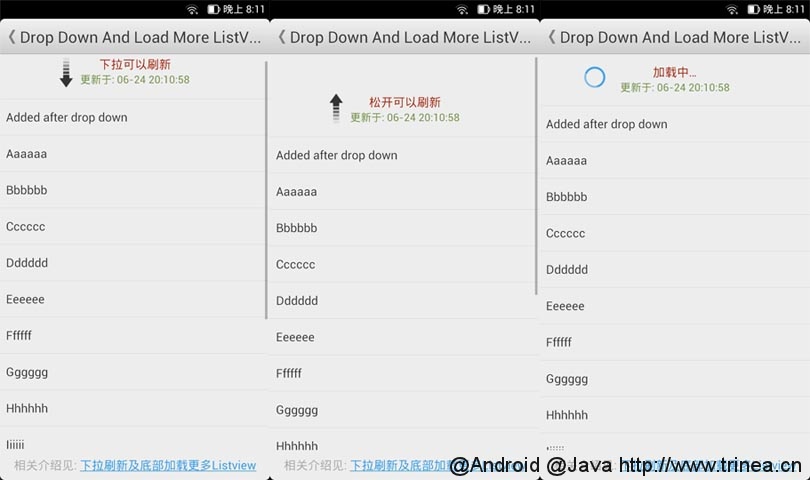
本文主要介绍**可同时实现下拉刷新及滑动到底部加载更多的ListView的使用。**
该ListView优点包括:a. 可自定义下拉响应事件(如下拉刷新) b.可自定义滚动到底部响应的事件(如滑动到底部加载更多) c.可自定义丰富的样式 d.高效(若下拉样式关闭不会加载其布局,同listView效率一致) e. 丰富的设置。
本文可运行APK地址可见[TrineaAndroidDemo.apk](https://play.google.com/store/apps/details?id=cn.trinea.android.demo "demo apk地址"),可运行代码地址可见[DropDownListViewDemo](https://github.com/Trinea/AndroidDemo/blob/master/src/cn/trinea/android/demo/DropDownListViewDemo.java "demo源码地址"),效果图如下:
**1、引入公共库**
引入[TrineaAndroidCommon@Github](https://github.com/Trinea/AndroidCommon "TrineaAndroidCommon项目Github上开源地址")(欢迎star和fork^\_^)作为你项目的library[(如何拉取代码及添加公共库)](http://www.trinea.cn/android/%e6%b7%bb%e5%8a%a0android-common-lib%e6%b7%bb%e5%8a%a0%e5%8f%8agoogle-code%e5%92%8cgithub%e5%a6%82%e4%bd%95%e6%8b%89%e5%8f%96%e4%bb%a3%e7%a0%81/ "Github和Google Code拉取代码及如何添加Android Common Lib"),或是自己抽取其中的[DropDownListView@Github](https://github.com/Trinea/AndroidCommon/blob/master/src/cn/trinea/android/common/view/DropDownListView.java "DropDownListView在Github上源码")部分使用。
**2、在layout中定义**
将布局中的ListView标签换成cn.trinea.android.common.view.DropDownListView标签
并加上自定义属性的命名空间xmlns:listViewAttr=”http://schemas.android.com/apk/res/cn.trinea.android.demo”,其中cn.trinea.android.demo需要用自己的包名替换。如何自定义属性及其命名空间可见本文最后。xml代码如下:
```
```
DropDownListView自定义了三个boolean属性
```
```
isDropDownStyle表示是否允许下拉样式,java代码中可自定义下拉listener,表示需要完成的任务
isOnBottomStyle表示是否允许底部样式,java代码中可自定义滚动到底部的listener,表示需要完成的任务
isAutoLoadOnBottom表示是否允许滚动到底部时自动执行对应listener,仅在isOnBottomStyle为true时有效
**PS:**如果isDropDownStyle或isOnBottomStyle为false,并不会加载对应的布局,所以性能同ListView一样。
**3、在Java类中调用**
通过setOnDropDownListener设置下拉的事件,不过需要在事件结束时手动调用onDropDownComplete恢复状态(注意需要在adapter.notifyDataSetChanged();后面调用)
通过setOnBottomListener设置滚动到底部的事件,不过需要在事件结束时手动调用onBottomComplete恢复状态,示例代码如下:
```
/**
* DropDownListViewDemo
*
* @author Trinea 2013-6-1
*/
public class DropDownListViewDemo extends BaseActivity {
private LinkedList listItems = null;
private DropDownListView listView = null;
private ArrayAdapter adapter;
private String[] mStrings = { "Aaaaaa", "Bbbbbb", "Cccccc", "Dddddd", "Eeeeee",
"Ffffff", "Gggggg", "Hhhhhh", "Iiiiii", "Jjjjjj", "Kkkkkk", "Llllll", "Mmmmmm",
"Nnnnnn", };
@Override
public void onCreate(Bundle savedInstanceState) {
super.onCreate(savedInstanceState, R.layout.drop_down_listview_demo);
listView = (DropDownListView)findViewById(R.id.list_view);
// set drop down listener
listView.setOnDropDownListener(new OnDropDownListener() {
@Override
public void onDropDown() {
new GetDataTask(true).execute();
}
});
// set on bottom listener
listView.setOnBottomListener(new OnClickListener() {
@Override
public void onClick(View v) {
new GetDataTask(false).execute();
}
});
listItems = new LinkedList();
listItems.addAll(Arrays.asList(mStrings));
adapter = new ArrayAdapter(this, android.R.layout.simple_list_item_1, listItems);
listView.setAdapter(adapter);
}
private class GetDataTask extends AsyncTask {
private boolean isDropDown;
public GetDataTask(boolean isDropDown){
this.isDropDown = isDropDown;
}
@Override
protected String[] doInBackground(Void... params) {
try {
Thread.sleep(1000);
} catch (InterruptedException e) {
;
}
return mStrings;
}
@Override
protected void onPostExecute(String[] result) {
if (isDropDown) {
listItems.addFirst("Added after drop down");
adapter.notifyDataSetChanged();
// should call onDropDownComplete function of DropDownListView at end of drop down complete.
SimpleDateFormat dateFormat = new SimpleDateFormat("MM-dd HH:mm:ss");
listView.onDropDownComplete(getString(R.string.update_at)
+ dateFormat.format(new Date()));
} else {
listItems.add("Added after on bottom");
adapter.notifyDataSetChanged();
// should call onBottomComplete function of DropDownListView at end of on bottom complete.
listView.onBottomComplete();
}
super.onPostExecute(result);
}
}
}
```
4、高级接口设置
5、样式设置(自定义header和footer信息)
见原文:[滚动到底部加载更多及下拉刷新listview的使用](http://www.trinea.cn/android/%e6%bb%9a%e5%8a%a8%e5%88%b0%e5%ba%95%e9%83%a8%e5%8a%a0%e8%bd%bd%e6%9b%b4%e5%a4%9a%e5%8f%8a%e4%b8%8b%e6%8b%89%e5%88%b7%e6%96%b0listview%e7%9a%84%e4%bd%bf%e7%94%a8/)
[www.trinea.cn](/admin/blogs/1893606/www.trinea.cn)